
If you’ve compared smartphones lately, you’ve probably seen “AMOLED display” on the spec sheet and wondered whether it matters. It does. You look at your screen for hours every day, and the technology behind it affects colors, contrast, battery life, and even the price you pay.
In this guide, you’ll learn what an AMOLED display is, how it works, and how it compares to LCD in seven key areas. By the end, you’ll know which screen type fits your needs and budget.
What Is an AMOLED Display?
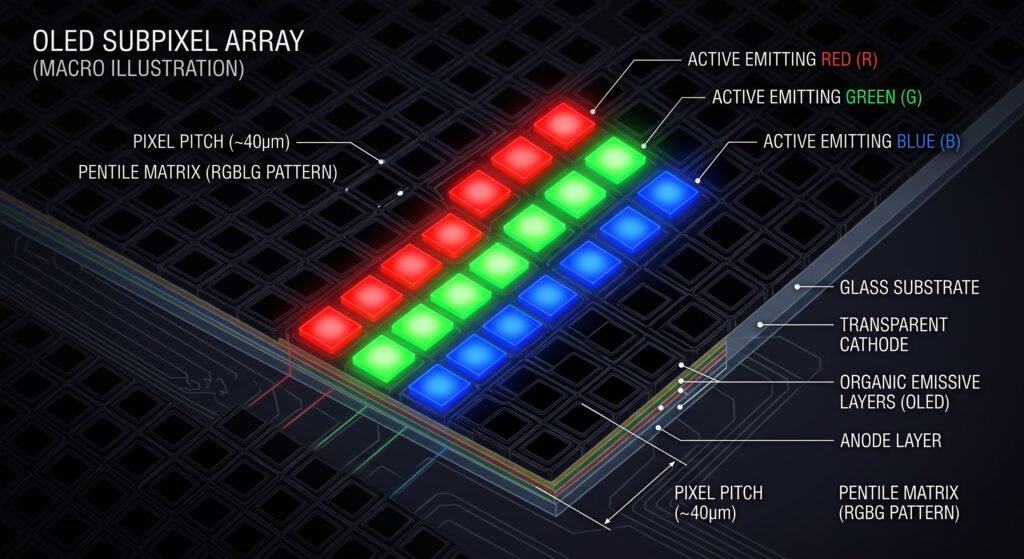
AMOLED stands for Active-Matrix Organic Light-Emitting Diode. It’s a type of OLED screen used in most flagship smartphones, smartwatches, and a growing number of laptops, tablets, and TVs.
Here’s what the name means:
- Organic Light-Emitting Diode (OLED): Each pixel is made of organic compounds that glow when electricity passes through them.
- Active Matrix: A layer of thin-film transistors (TFTs) controls each pixel individually, switching it on and off very quickly.
How AMOLED Technology Works
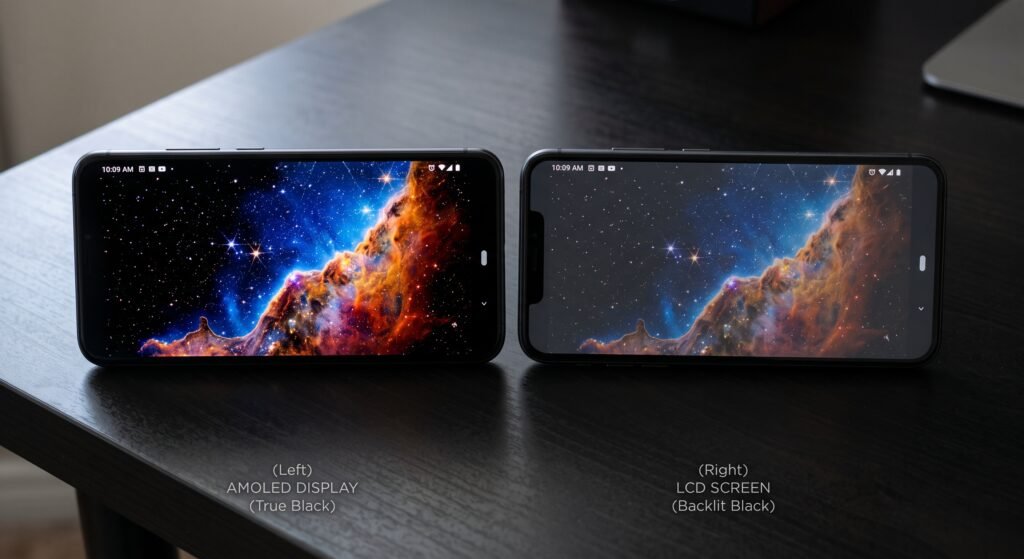
The core idea is simple. Every pixel produces its own light, so there’s no backlight behind the screen. When a pixel needs to show black, it switches off completely. That is why AMOLED screens have deep blacks, rich colors, and a slim build.
You’ll also see Super AMOLED, which is Samsung’s version. It builds the touch layer directly into the display, making the panel thinner and slightly easier to read outdoors.
What Is an LCD Display?
LCD stands for Liquid Crystal Display. It’s an older, proven technology that is still common in budget phones, computer monitors, and many TVs.
How LCD Screens Produce an Image
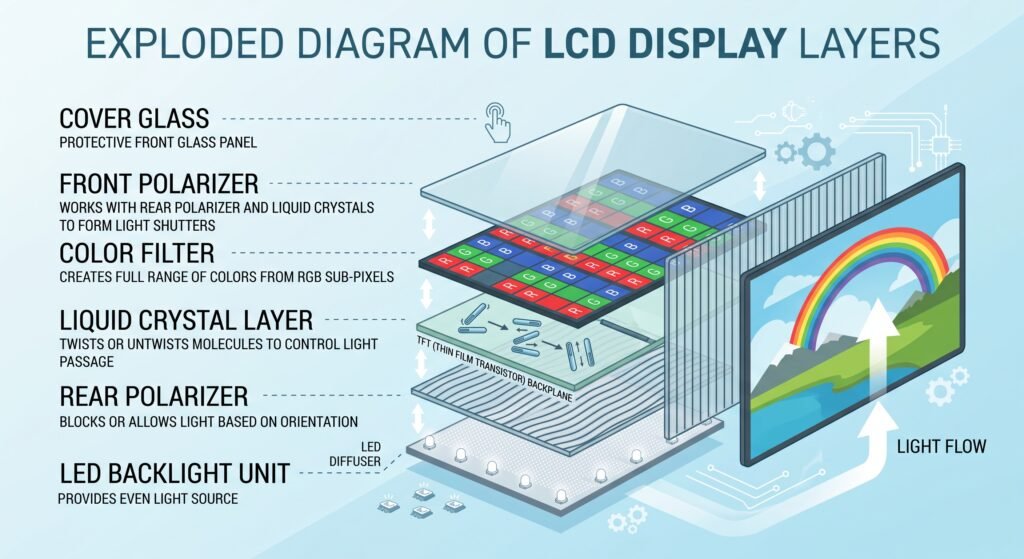
LCD pixels don’t make their own light. A backlight, usually made of LEDs, shines constantly from behind the panel. Liquid crystals twist to block or pass that light, and color filters turn it into red, green, and blue.
Most phones with LCDs today use IPS (In-Plane Switching) panels, which offer better colors and viewing angles than older LCD types.
AMOLED vs LCD: 7 Key Differences
1. Contrast and Black Levels
This is AMOLED’s biggest advantage. Because pixels turn off completely, blacks are truly black, and contrast is nearly infinite. On an LCD, the backlight leaks through even dark areas, so blacks look dark gray, especially in a dim room.
2. Color Quality
AMOLED displays deliver vivid, saturated colors that make photos and videos stand out. LCDs, particularly good IPS panels, tend to show more natural colors. Some people find AMOLED colors too bold, but most phones let you switch to a “natural” color mode.
3. Brightness and Outdoor Visibility
LCDs have traditionally been strong at sustained, full-screen brightness. However, modern flagship AMOLED screens have caught up and often beat LCDs in peak brightness, making them easy to read in direct sunlight.
4. Battery Life
An AMOLED display uses almost no power for black pixels. So if you use dark mode or dark wallpapers, you can save a noticeable amount of battery. An LCD’s backlight stays on no matter what’s on screen, so dark mode doesn’t help much.
5. Thickness and Flexibility
With no backlight layer, AMOLED panels are thinner and lighter. They can also be built on flexible materials, which is what makes foldable phones and curved-edge screens possible. LCDs are thicker and rigid by design.
6. Viewing Angles and Response Time
AMOLED screens keep their colors and contrast when viewed from an angle, and their pixels respond almost instantly. That means smoother scrolling and less motion blur in games. IPS LCDs have good viewing angles too, but they lose some contrast at sharp angles.
7. Lifespan, Burn-In, and Price
This is where LCD fights back. The organic materials in AMOLED screens wear down over time, and static elements like navigation bars or status icons can leave a faint permanent “ghost” image. This is known as AMOLED burn-in. LCDs rarely suffer from it.
Some AMOLED screens also use PWM dimming at low brightness, which can cause eye strain for sensitive users. Finally, AMOLED panels cost more to make, so they usually appear in mid-range and premium devices, while LCDs keep budget devices affordable.
AMOLED vs LCD: Quick Comparison
| Feature | AMOLED | LCD |
| Black levels | True black | Dark gray |
| Contrast | Nearly infinite | Moderate |
| Colors | Vivid, saturated | Natural |
| Battery with dark mode | Big savings | Little change |
| Thickness | Thin, flexible | Thicker, rigid |
| Burn-in risk | Possible | Very low |
| Cost | Higher | Lower |
AMOLED or LCD: Which Should You Choose?
Choose AMOLED If…
You watch lots of videos, play games, love dark mode, or want a premium phone with a slim or foldable design. For most people buying a mid-range or flagship smartphone today, an AMOLED display is the better all-round choice.
Choose LCD If…
You’re on a tight budget, keep static content on screen for hours (like navigation or work dashboards), or are sensitive to screen flicker. A good IPS LCD still offers accurate colors and reliable long-term performance.
How to Reduce AMOLED Burn-In
If you go with AMOLED, a few simple habits keep your screen healthy:
- Use dark mode and change your wallpaper now and then.
- Enable auto-brightness instead of keeping brightness at maximum.
- Set a short screen timeout.
- Use gesture navigation to avoid a fixed navigation bar.
Final Thoughts
An AMOLED display lights each pixel on its own, giving you true blacks, rich colors, better battery life with dark mode, and slimmer designs. LCD relies on a backlight, which makes it cheaper and more resistant to burn-in, but it can’t match AMOLED’s contrast.
In the AMOLED vs LCD debate, there’s no single winner for everyone. If picture quality and a premium feel matter most, choose AMOLED. If value and durability come first, a quality LCD is still a smart buy. Now that you know the differences, you can read any spec sheet with confidence.